
How to Deposit Funds via Bank Transfer/OSKO
1. Find Your CoinByte Bank Transfer Details
App
Select the Asset at the bottom.
Select AUD
 .
.Select the Deposit button at the bottom.
Select the Continue button at the bottom.
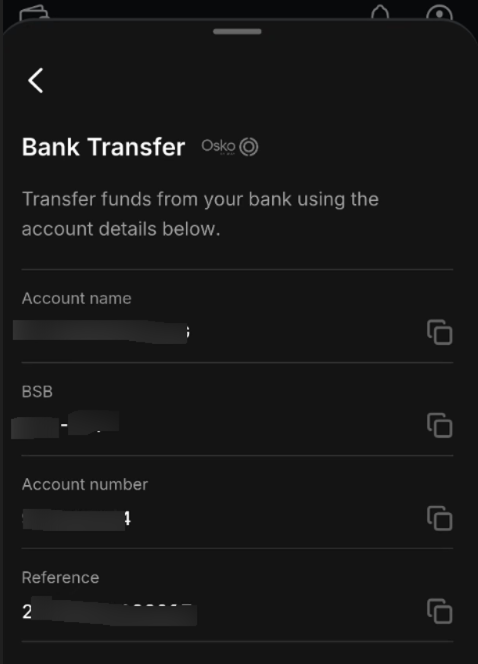
For Bank Transfer deposit, copy the Account name, BSB, Account number, and Reference inside, to make the deposit convenient.
Web
Select Asset in the header.
Select Deposit from the left-hand menu.
Choose the currency you wish to deposit at the top of the page.
Select Bank Transfer and copy the deposit information provided.
2. Initiate a New Deposit from Your Bank
Log in to your online banking and create a new bank transfer.
Enter the CoinByte bank details obtained from the deposit screen.
You may enter any information in the reference field for your records. The deposit will still be processed successfully without a reference.
Enter the amount you wish to transfer and complete the transaction.
Processing Times for Bank Transfers
Osko-enabled banks: Typically within a minute.
Non-Osko banks: May take 2-3 business days.
Deposit Delays
First-time deposits: May take up to 24 business hours due to bank security protocols.
CBA/Bankwest Policy: Commonwealth Bank (CBA) and Bankwest impose a 24-hour holding period for all crypto exchange deposits, regardless of your deposit history. This is a standard banking security measure.
If Your Deposit Is Delayed
Check the status of the deposit in your online banking. If it shows as 'Pending', it is still with your bank.
Contact your bank to inquire about the delay.
Note that banking business hours apply. For example, deposits made on a Friday or over the weekend may arrive by the following Monday.
If you still cannot determine why your deposit hasn't reached your CoinByte account, please contact us via live chat.
Deposit Limits
Minimum deposit amount: $10 AUD or $10 NZD.
Daily Deposit Limit: $50k AUD or $50k NZD each day.
Fees for Bank Transfer Deposits
CoinByte does not charge any fees for deposits. However, your financial institution may impose a fee.
Free
Verification
We may request additional verification if we detect suspicious deposits in your account.
Viewing Deposit/Withdrawal History
To learn how to review your deposit or withdrawal history, please refer to Transaction-history.