
If you've sent or received crypto on CoinByte recently, you may have noticed a new prompt asking for extra details about the other party in the transaction. This isn't a bug — it's part of Australia's new Travel Rule requirements, and every regulated exchange is rolling out something similar.
This guide walks you through exactly what's changed, why, and what you'll need to have ready the next time you send or receive crypto.
What is the Travel Rule?
The Travel Rule is a regulatory requirement that applies to crypto exchanges (VASPs — Virtual Asset Service Providers) in Australia and many other countries. It requires exchanges to collect and share basic information about the sender and recipient of a crypto transfer, similar to how banks already handle wire transfers.
Starting 1 July 2026, CoinByte is required to collect this information whenever you deposit or withdraw crypto assets.
📌 Note: No action is needed if you don't send or receive crypto. This only affects deposit and withdrawal transactions.
What You'll Need to Provide
There are two sides to this — sending crypto out of CoinByte, and receiving crypto into CoinByte. The information required depends on who you're transacting with.
Let's go through both flows.
🔼 Sending Crypto (Withdrawals)
When you withdraw crypto to another exchange or a self-hosted wallet, you'll see an Address Confirmation prompt after confirming your withdrawal details.
🔽 Receiving Crypto (Deposits)
If you're expecting an incoming transfer from another exchange or a self-hosted wallet, you'll need to complete one extra step to release the funds.
How to find it:
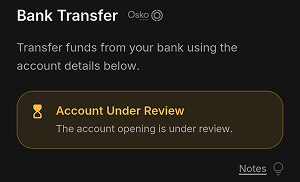
Go to the Deposit page

Click on Account Under Review
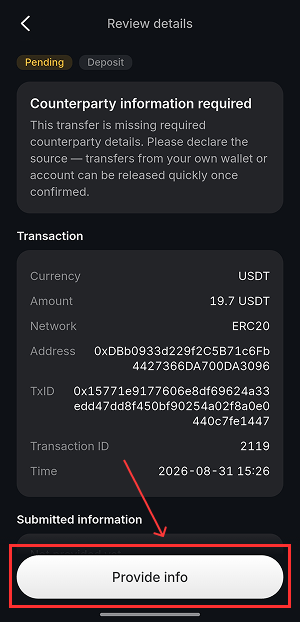
You'll see a prompt asking for Review details,click provide info
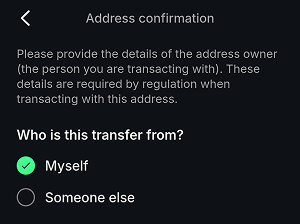
Step 1 — Who is this transfer from?
Myself — you're moving funds from a wallet or exchange account that belongs to you
Someone else — a third party (friend, family, or a business) is sending you the funds
What happens next depends on which one you choose.
If you select "Myself"
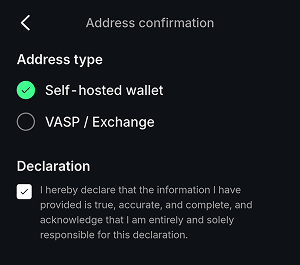
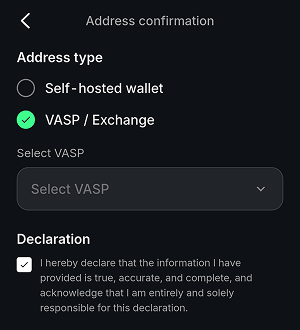
You'll be asked to confirm the Address type:
Self-hosted wallet → Tick the declaration confirming the information you've provided is true and accurate, then tap Submit.
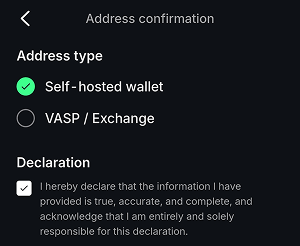
VASP/Exchange → Select the sending platform from the Select VASP dropdown, tick the declaration, then tap Submit.
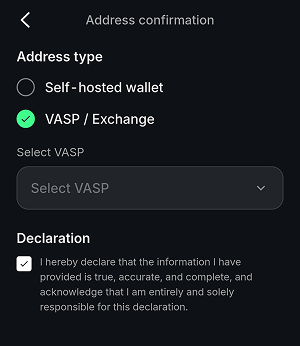
If you select "Someone else"
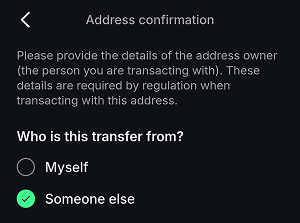
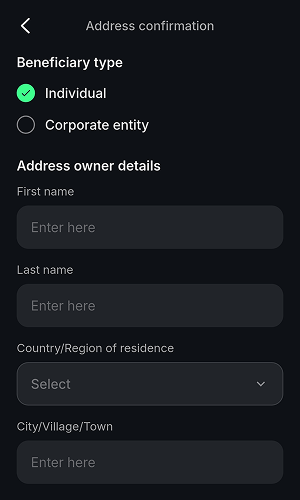
You'll first need to identify the Beneficiary type — i.e. who is sending you the funds — and provide their details:
Individual:
Corporate entity:
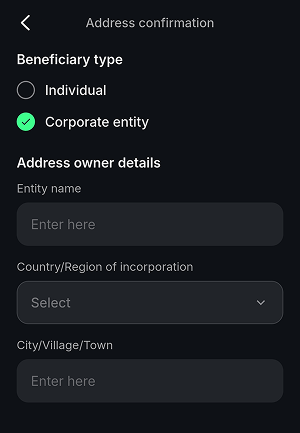
Tap Next once these are filled in.
You'll then confirm the Address type, the same as the "Myself" flow above:
Self-hosted wallet → tick declaration → Submit
VASP/Exchange → select VASP → tick declaration → Submit
Once submitted, your deposit will be processed.
What If I Don't Provide the Information?
If the required details are incomplete, your transaction may be:
Delayed while CoinByte requests the missing information, or
Returned to the originator in certain cases
To avoid delays, make sure you (or the person sending you funds) have the correct details on hand before starting a transfer.
Why Is CoinByte Doing This?
CoinByte is a registered business name of BYTEATLAS PTY LTD (ABN 54 637 345 290), regulated by ASIC and AUSTRAC. These changes are part of our ongoing commitment to meeting Australia's regulatory requirements while keeping the platform safe for everyone.